
OpenEZ Graph
OpenEZ Graph is a local-first code intelligence engine for indexing codebases and docs into a reusable retrieval runtime for CLI tools, MCP clients, and a management UI. It is designed around a SQLite-first, multi-workspace architecture with the CLI and MCP server as the primary workflow, while the web app acts as an operational layer for inspection and management.
Why OpenEZ Graph
LLM coding agents waste tokens repeatedly re-reading the same codebase, configuration, and documentation context. A pre-indexed graph-and-chunk runtime reduces repeated file reads, improves retrieval quality, and makes local agent workflows cheaper and more predictable. OpenEZ Graph focuses on the local-first path: zero-config setup, local SQLite storage, workspace-aware indexing, auto-sync on file changes, and MCP access over the same indexed runtime.
What it does
- Indexes local codebases and docs into documents, chunks, graph nodes, graph edges, memories, and queryable workspace state.
- Stores workspace metadata and index state locally in SQLite rather than requiring Postgres or Redis for the default path.
- Exposes the same runtime through a CLI, a web dashboard, and an MCP server.
- Supports multi-workspace lookup and MCP reads across one or many registered workspaces.
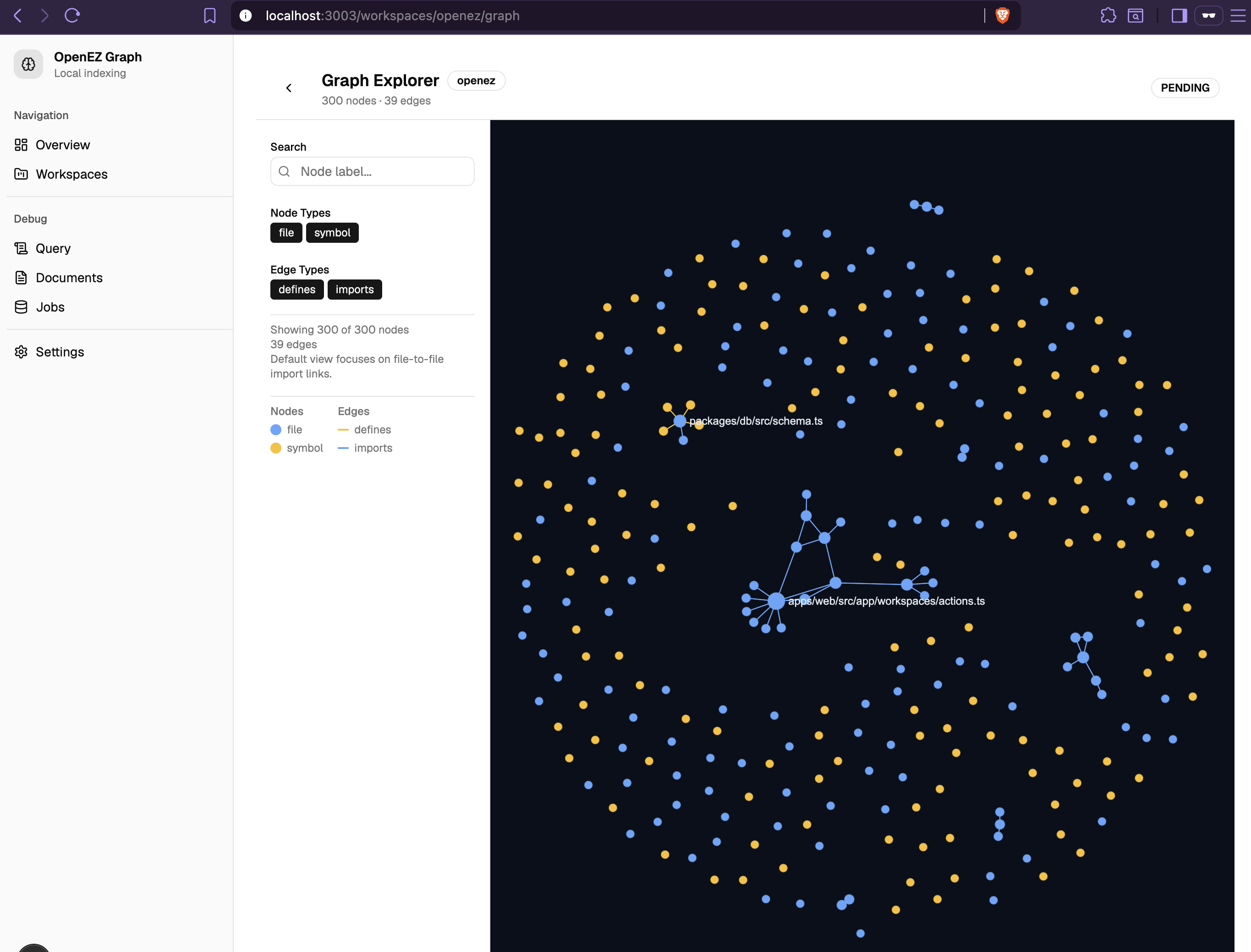
- Includes a graph explorer, indexing status surfaces, and workspace management in the web app.
Architecture
OpenEZ Graph is organized as a monorepo with app entrypoints for the CLI, MCP server, web app, and worker, plus shared packages for config, core retrieval logic, database access, indexing, queue integration, and UI components. The current architectural direction in the repo explicitly describes the system as SQLite-first, multi-workspace, and CLI/MCP-first, with the web app positioned as a management layer rather than the center of the system.
Main runtime pieces
apps/cli: theopenezcommand for initializing, indexing, watching, serving MCP, checking status, and listing workspaces.apps/mcp: the standalone MCP server runtime.apps/web: the Vite + TanStack Router management UI with workspaces, documents, jobs, query pages, settings, and graph explorer routes.packages/core: retrieval, graph, memory, tokenizer, and ranking logic.packages/db: SQLite registry/workspace repositories and resolution helpers.packages/indexer: workspace indexing and language-specific parsing/chunking logic.
Storage model
Local SQLite in WAL mode. No Docker, Postgres, or Redis required.
- Global registry DB at
~/.openez/registry.sqlite— stores workspace metadata - Per-workspace DB at
<project>/.openez/index.sqlite— stores documents, chunks, embeddings, graph nodes/edges, memories - Project-local hint at
<project>/.openez/workspace.json— used for workspace resolution
Schema is auto-created on first access. No migrations needed.
Supported content
TypeScript and JavaScript currently have the richest indexing path in this round. Python, Go, and Rust are supported in a more basic structured form, while YAML, JSON, TOML, and Markdown (including checklists) are indexed for document context and retrieval rather than full semantic parity with the TS/JS path.
Quick start
Requirements
- Node.js 20+
For end users
npm install -g @openez-graph/cli
openez setup claude    # or: codex, opencode
Restart your agent. Done. The MCP server will auto-register, auto-index, and auto-sync on file changes.
For developers (from source)
pnpm install
pnpm openez setup claude    # wire up Claude Code (or: codex, opencode)
Zero-config behavior
When the MCP server starts, it automatically:
- Auto-registers the current project as a workspace
- Auto-indexes if the workspace has no documents yet
- Auto-syncs on file changes (2s debounce)
No config file needed. No Docker. No Postgres. No env vars required.
Manual workflow (optional)
openez init .           # register + index current directory
openez serve --mcp      # start MCP server (auto-syncs on file changes)
Build the CLI bundle
pnpm build:cli # outputs dist/cli.cjs (single-file bundle)
Run the web dashboard
pnpm dev:web
The root scripts also include start, build:web, build:cli, mcp, worker, typecheck, lint, and test.
CLI
The CLI package registers the openez command and currently supports the following main commands.
pnpm openez init /path/to/project
pnpm openez index /path/to/project
pnpm openez reindex /path/to/project
pnpm openez watch /path/to/project
pnpm openez status /path/to/project
pnpm openez list
pnpm openez serve --mcp
pnpm openez serve --web                    # API server trên port 11368
pnpm openez serve --web --port 8080        # port tùy chọn
pnpm openez setup codex /path/to/project
pnpm openez setup claude /path/to/project
pnpm openez setup opencode /path/to/project
Command summary
init: register a workspace and run initial index (--no-indexto skip).index: run incremental indexing for a workspace.reindex: run a full rebuild.watch: watch files and re-index on changes.status: show workspace indexing and graph counts.list: list registered workspaces.serve --mcp: start the MCP server (auto-indexes + auto-syncs by default).serve --web: start the web dashboard API server (default port 11368,--portto customize).setup codex: wire up OpenEZ MCP in Codex config.setup claude: wire up OpenEZ MCP in Claude Code settings.setup opencode: wire up OpenEZ MCP in OpenCode config.
MCP usage
OpenEZ Graph exposes MCP tools for listing workspaces, querying memory/retrieval context, fetching code context, inspecting graph neighbors, writing memory, and triggering workspace indexing.
The MCP resolver supports default workspace resolution, explicit single-workspace resolution, and multi-workspace read scopes through workspaceIds or paths.
Core MCP tools
list_workspaces— list registered workspaces and their statusmemory_query— RRF-ranked retrieval (FTS + vector + graph expansion)code_context— graph-adjacent context for a symbol or file pathgraph_neighbors— raw graph nodes/edges around a label or node IDmemory_write— persist a technical decision or learned noteindex_workspace— trigger incremental or full re-index
Auto-sync
When serve --mcp starts, it automatically:
- Resolves the workspace from the current directory (or
.openez/workspace.json) - Registers it if not yet registered
- Indexes it if no documents exist yet
- Starts a file watcher (2s debounce) that re-indexes on file changes
No manual watch command needed when using MCP.
Agent MCP setup
pnpm openez setup codex /path/to/project
pnpm openez setup claude /path/to/project
pnpm openez setup opencode /path/to/project
These commands write or update a shared OpenEZ MCP server entry in the respective agent's config:
- Codex:
~/.codex/config.toml - Claude Code:
~/.claude/settings.json - OpenCode:
~/.config/opencode/opencode.json
Web UI
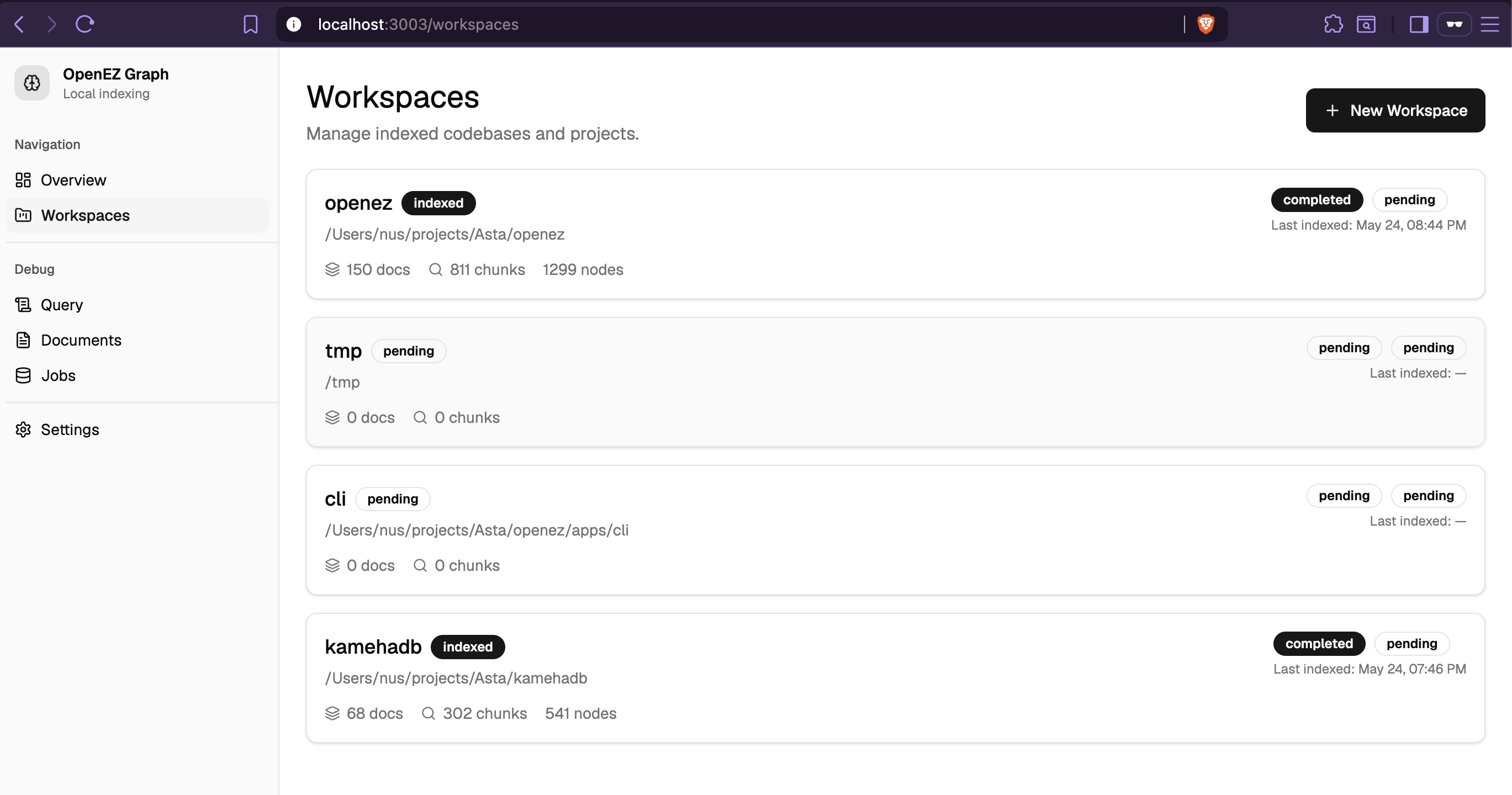
The web app is a Vite + TanStack Router management UI with routes for overview, workspaces, documents, jobs, query, settings, and per-workspace graph exploration. Workspace detail pages expose status, indexing control, graph status, recent runs, and an entrypoint to the graph explorer, while the graph page renders workspace-scoped graph data and empty states when graph data is missing.
UI Demo
The web dashboard provides visual workspace management and graph exploration:
Workspace
Graph
Project layout
apps/
  cli/
  mcp/
  web/
  worker/
packages/
  config/
  core/
  db/
  indexer/
  queue/
  ui/
documents/
openez-wiki/
plans/
tests/
This structure reflects the current repo organization captured in the repository snapshot.
Current status and constraints
The project is SQLite-first, multi-workspace, and local-first. No external services required.
Queue-backed jobs (BullMQ/Redis) are compatibility-only in the worker app and are not part of the default runtime path. TS/JS has the richest indexing via ts-morph; Python, Go, and Rust have basic symbol extraction.
Development
pnpm build:cli          # build CLI bundle for distribution
pnpm dev:web          # start web dashboard
pnpm build:web        # build web dashboard
pnpm mcp              # start MCP server
pnpm worker           # start background worker (optional)
pnpm typecheck        # type check all packages
pnpm lint             # lint all packages
pnpm test             # run vitest tests
Contributing
Contributions are most useful when they reinforce the current architecture: engine/runtime/UI separation, local-first defaults, SQLite as the main path, and MCP-first retrieval flows.
Publishing
The CLI is published to npm as @openez-graph/cli. The package is a single-file CJS bundle (~15MB) with better-sqlite3 as the only runtime dependency.
Prerequisites
- npm account with 2FA enabled
- Member of
openez-graphorganization on npm - Node.js 20+
Steps
# 1. Build the bundle
pnpm build:cli

# 2. Bump version (patch / minor / major)
cd apps/cli
npm version patch    # 0.1.1 → 0.1.2

# 3. Publish (will prompt for browser auth if 2FA is enabled)
npm publish --access public
Verify
npx @openez-graph/cli --help
npm install -g @openez-graph/cli
openez setup claude
Notes
dist/cli.cjsis the only file shipped (plus README.md and package.json)better-sqlite3is a native module — installed automatically as a dependency- All workspace packages (
@openez-graph/config,core,db,indexer,mcp) are bundled intodist/cli.cjsvia tsup — not published separately - The
filesfield inapps/cli/package.jsoncontrols what gets published
Roadmap themes
Based on the planning docs in the repo, major themes include simpler one-command local setup, stronger multi-language support, SQLite-first indexing, removal of old config assumptions, and better MCP-first workflows.
Changelog
feat/tanstack-migration
Migration
- Migrated from Next.js 15 app router to Vite + TanStack Router
- Added TanStack Query with
queryOptionsfactories inlib/queries.ts - Wired
queryClientinto router context for typed loader access - Replaced Next.js
app/pages with TanStack Routerroutes/(Vite entrypoint)
Performance
- Route loaders prefetch data on navigation via
queryClient.ensureQueryData - Next-page prefetch for documents pagination via
useEffect - Workspace detail hover prefetch via
onMouseEnteron workspace cards - Graph data deduplication when sidebar and detail page request simultaneously
staleTime: 1 hourwithrefetchOnMount: falseto minimize refetchesplaceholderData: (prev) => prevfor instant page transitions
Pagination Fix
- Replaced
<a href>tags with TanStack Router<Link search={}>inPaginationcomponent - Eliminated full browser page reloads on pagination click
- Client-side navigation keeps query cache intact across page changes
Refactors
- Consolidated query definitions into
lib/queries.ts - Moved
Paginationfromcomponents/tolib/
feat/graph-page-caching
Performance
- Graph page: LRU cache (30s TTL, max 50 workspaces) for workspace graph data
- Graph page: prepared statements via
getWorkspaceGraphOptimized()for single-query node+edge fetch - Graph page: composite DB indexes for faster edge lookups
- WorkspaceGraph: reduced ForceAtlas2 iterations from 50 to 20
- GraphClient: pass only
filteredNodes/filteredEdgesto graph instead of full dataset - WorkspaceGraph: removed
visibleNodeIdsprop and visibility hide/show effect
Pagination
- Reusable
Paginationcomponent with<a>tags (avoids Next.js 15 Link type issues) /workspaces/— paginated via in-memory slice/documents/— true SQL-level offset/limit pagination (no more 200-item ceiling)/jobs/— page clamp, shows allindex_runsacross all workspaces (was showing only 1)
Bug Fixes
useThemetoggle: useresolvedThemeinstead ofthemeso"system"doesn't break toggleinitcommand: now runs index automatically (--no-indexto skip)"use server"compliance: wrappedgetWorkspaceGraphCachedin async function- Conflicting cache directives: removed
revalidatefrom graph page (keptforce-dynamic) - Jobs page: clamp
currentPageto[1, totalPages]so?page=999doesn't show empty - Queue: fixed ioredis version type mismatch via type assertion
- OpenCode config: fixed schema (top-level
mcpkey,"type": "local"server entries)
Refactors
- Consolidated duplicate
formatDate,NODE_COLORS,EDGE_COLORS,getNodeColor,getEdgeColorintolib/utils.ts - StatusBadge component re-added to workspaces list page
PAGE_SIZEandpaginate()exported fromPaginationcomponent, replacing inline slice arithmetic
License
MIT